


Ever opened an app at night and got hit with a bright white screen? It’s annoying and hard on the eyes. That’s exactly the problem Android 17 Beta 3 dark mode is trying to fix.
With this update, Google gives users something new: the power to force dark mode on almost any app, even if the app never supported it before. It means more control, better comfort, and a smoother experience across your phone.
In this article, you’ll learn how this feature works, how to enable it, and whether it’s actually worth using right now.
Table of Contents
Featured Snippet: What Is Android 17 Beta 3 Dark Mode?
Android 17 Beta 3 dark mode lets users force dark theme on all apps, including those that don’t support it. It works by overriding app settings and applying a darker interface system-wide or per app. It helps reduce eye strain and gives users more control over how apps look.
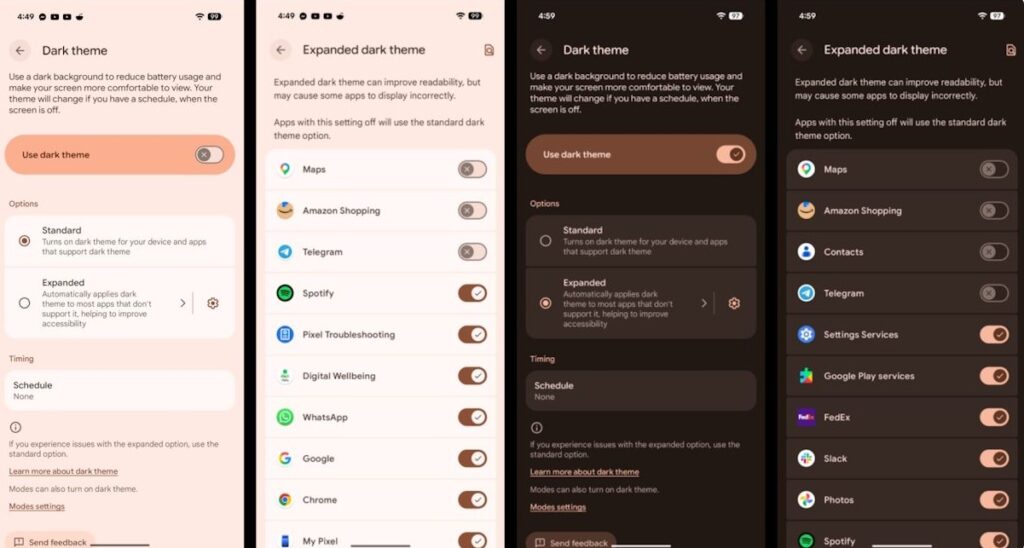
What Is Expanded Dark Mode in Android 17 Beta 3?
Android 17: A Simple Explanation
Expanded Dark Mode is a new setting that lets you control how each app looks. Before this, dark mode depended on whether app developers supported it.
Now, you’re in charge.
Android 17: What Makes It Different?
- Works on both system apps and third-party apps
- Let’s you force dark mode on unsupported apps
- Allows mixing dark and light apps on the same device
- Gives more control instead of one global setting
It is a big shift from how Android handled themes in the past.
(Also See: Apple’s Worst Nightmare: Android’s Quick Share Just Became an AirDrop Killer)
Why This Update Feels Like a Big Deal
1. You Control the Experience
Earlier, you had to accept whatever the app offered. Now, you can decide:
- Keep your phone in dark mode
- Use light mode for specific apps like shopping or reading
- Force dark mode on apps that feel too bright
It’s flexible and personal.
2. Better for Your Eyes
Dark mode is not just about looks. It helps in real ways:
- Reduces eye strain at night
- Cuts down harsh screen glare
- Makes long screen time more comfortable
For people sensitive to bright light, this feature can make a big difference.
How to Enable Android 17 Beta 3 Dark Mode
If you’re using a supported device like a Pixel phone, follow these steps:
Step-by-Step Guide
- Open Settings
- Tap Display & touch
- Select Dark theme
- Turn on Expanded Dark Mode
Once enabled, you can adjust how each app behaves.
Real-World Example: How It Actually Helps
Let’s say you use your phone at night.
- Your system stays in dark mode
- You open a shopping app that usually stays bright
- Now, it switches to a darker interface
Or the opposite:
- You keep your phone in light mode during the day
- But force dark mode on social media apps
This level of control was missing before.
The Catch: It’s Not Perfect Yet
Some Apps May Break
Since this feature forces changes, not all apps handle it well.
You might see:
- Weird colors
- Text that’s hard to read
- Layout issues
Why This Happens
For smooth performance, developers need to support it properly using the right settings in their apps.
Until then, results may vary.
Should You Use Expanded Dark Mode Right Now?
Use It If:
- You use your phone a lot at night
- Bright screens bother your eyes
- You like customizing your phone
Skip It If:
- You want a stable, bug-free experience
- You rely on apps where design matters (like banking or editing apps)
Conclusion
Android 17 Beta 3 dark mode is a strong step toward giving users real control over their phone’s look and feel. It solves a common problem and makes everyday use more comfortable, especially at night.
It’s not perfect yet, and some apps still need to catch up. But the idea is solid, and once developers fully support it, this could become one of the most useful features in Android.
If you like customizing your phone and care about eye comfort, this is definitely worth trying.