

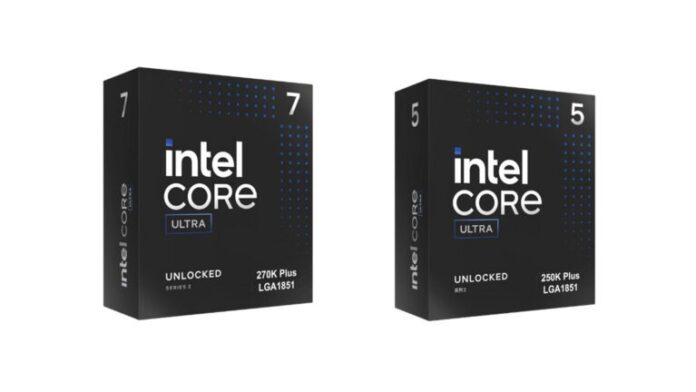
Out of nowhere, Intel drops new desktop chips meant to boost both gaming and work speed – without spiking the price tag. Sitting front and center: the Intel Core Ultra 200S Plus lineup, fine-tuned for quicker reactions under pressure. Speed leaps come from boosted clocks, cleverer core handling, and internal data pathways that now move information at a snappier pace. Instead of starting over, the plan leans into smart tweaks – not a total overhaul. By sharpening only what matters most, real-world experience gets better exactly where players and makers feel it. What stays unchanged? The cost curve remains steady even as gains stack up behind the scenes.
Right up front, two chips lead the charge: Intel Core Ultra 7 270K Plus and its sibling, Intel Core Ultra 5 250K Plus. Found in the high-end desktop tier, they aim at folks who need strong performance but don’t want to pay top-shelf prices. When it comes to running cutting-edge games or powering through video editing and coding tasks, these CPUs deliver solid performance without breaking the bank. For builders weighing cost against speed, Intel positions them as a smart middle ground.
Now set to hit stores by March 26, 2026, the Core Ultra 200S Plus line steps into a crowded desktop chip race where rivals keep raising the bar. This move highlights Intel sticking with its split-core design – balancing speed-focused and power-saving processors – to manage tasks smarter across different demands. Pressure from competitors has made every new model push harder on raw improvements than the last. Aimed clearly at builders who play hard, make content, or just demand quick system feedback, these chips promise solid app-to-app flow while staying within tighter spending limits. Though others scramble to impress, this release holds its ground for users seeking reliability and responsiveness.
Table of Contents
Intel Core Ultra 200S Plus Series Overview
Starting with Intel’s Arrow Lake base, the Intel Core Ultra 200S Plus line takes a different path. Rather than crafting fresh chip layouts, engineers focused on tuning what already exists. Each core now delivers stronger output through smarter design tweaks. Communication between processor parts also runs more smoothly thanks to internal upgrades. These changes may seem minor at first glance. Yet when handling everyday tasks, even tiny gains can shift how fast things feel.
New Processor Family Key Features
Faster clock rates lead off the changes, followed by gains in power efficiency and faster data flow within the chip. Smoother gameplay results when these pieces work together, also boosting how quickly the system handles multiple jobs at once. Around a fifteen percent jump in game speed shows up versus older Intel Core Ultra Series 2 chips, Intel says – but real-world numbers shift based on title choice, graphics card match, and machine setup. A key upgrade stands out: faster links between chip sections make communication smoother. Picture the CPU like a compact town where neighborhoods share constant updates. When pathways between them lag, delays pile up, slowing every task. With better connections, Intel clears the bottlenecks – data flows quicker, response times shrink, and movement across the silicon feels lighter.
Now here’s a twist: Intel adds Binary Optimisation to these chips, working at the code level behind the scenes. Not waiting for app makers to tweak every program, it quietly refines how older apps talk to the CPU. Performance might improve simply because the system adapts; no ground-up rebuild is needed. Intel Core Ultra 7 270K Plus delivers high-end gaming performance.
Top spot goes to the Intel Core Ultra 7 270K Plus in this updated range. Though not labeled a luxury-tier leader, its specs keep it deep in the high-end zone. Built mainly for gamers and makers, it delivers solid single-task speed with serious multitasking muscle.
Understanding CPU Cores and Threads
Inside this chip, 24 cores are split into two groups: 8 built for speed and 16 tuned for power efficiency. While older designs use the same kind of core throughout, Intel here gives separate jobs to each group. When heavy apps run – like game physics or video creation – the fast cores jump in first. Background chores like updates or syncing happen on quieter cores instead. That way, intense work does not slow down everyday operations.
WoWork is more effectively spread out because of its design. Rather than using top-tier cores for small jobs, lighter tasks shift over to simpler ones. That leaves the heavy-duty parts free for demanding actions. Power use drops, and speed stays sharp when things run this way. Efficiency climbs without losing quick reactions.
With support for 24 threads, performance stays smooth even when juggling many jobs at once (A thread is a sequence of programmed instructions that the chip handles as a unit). Creators running numerous apps together might find their work moves faster because of how well it handles overlapping tasks.
Turbo Speeds and Better Performance
What keeps mattering most for games? Clock speed. The Intel Core Ultra 7 270K Plus takes it higher, hitting bursts near 5.5 GHz. When clocks run fast, tasks finish quicker – less lag shows up during play. Frames build faster, too, so motion feels more fluid on screen.
When every millisecond counts in fast-paced games, extra clock cycles help keep frames steady and delays low. It’s not just about quicker performance – movement seems tighter, controls snap into place. On screens that refresh many times per second, barely-there gains in processor speed still show up clearly.
Folks who make digital art might find a real edge here. Video editing, crafting 3D scenes, and heavy number crunching – all demand serious processor muscle. Thanks to fast solo-core output alongside plenty of cores, the Intel Core Ultra 7 270K Plus targets smooth runs whether playing games or pushing creative jobs hard.
Intel Core Ultra 5 250K Plus: A balanced choice for performance seekers
A 24-core chip isn’t something every PC assembler actually uses – Intel gets that. Built for fans chasing solid power without stretching budgets, the Intel Core Ultra 5 250K Plus fits right in. Sitting under the Ultra 7 version doesn’t dull its edge; specs here were once considered top-tier not long ago.
Core Layout and Multitasking Ability
One step ahead in quiet strength, this chip packs 14 cores – 6 built for speed, 8 tuned to save power. Built like a smaller cousin of a bolder model, it keeps the split personality of fast and frugal parts. Fewer cores do not drag down its skill, because balance shapes how tasks flow across units. Even stripped back, it handles multiple tasks at once without stalling.
Even with several apps active, the system stays responsive thanks to efficiency cores handling quieter jobs. When a game uses the faster cores, tasks like cloud backups, patch downloads, or voice chat streams shift to the slower cores. This keeps the play fluid. A different part of the processor quietly manages these chores so the main work doesn’t stumble.
Freed from juggling tasks, the system keeps pace in resource-intensive apps while quietly handling background tasks.
Gaming and Productivity Performance in Real-World Use
Midway through intense gameplay, the Intel Core Ultra 5 250K Plus hits bursts up to 5.2 GHz – fast enough to keep pace with today’s game demands. Games these days lean more on swift individual cores instead of massive numbers stacked together. So even though it runs with fewer cores compared to the Ultra 7 model, performance stays solid when frames matter most. Speed wins where count falls short.
Rendering clips runs faster thanks to additional efficiency cores during editing. Though heavy multitasking can’t quite match what a 24-core chip delivers, this setup still aligns cost, energy use, and speed in a way that makes sense. Performance stretches far without spiking the bill.
Designed for gamers on a budget, this chip meets performance needs for a wide range of users. Mid-tier systems often benefit from their balanced capability. It avoids excess while providing sufficient power. Its performance aligns well with cost considerations, making it a noteworthy option for those seeking value and reliability.
Hybrid Architecture Explained
One way to look at Intel’s newer chips? They mix two types of core rather than using just one. Sounds tricky at first, yet what it does feels pretty straightforward. These parts inside the processor handle separate jobs, splitting workloads naturally through design choice rather than repetition. Not every task gets pushed into the same mold – some go here, others there.
Performance Cores versus Efficiency Cores
Speed-focused cores handle intensive tasks such as game math or detailed image creation. When fast number crunching matters, these parts do the lifting. Higher ticking rates power them, along with smart command groups for tough steps. Built to push through demanding actions without slowing down.
Running quietly in the background, efficiency cores save power while handling routine tasks. Instead of pushing speed, they manage steady tasks using minimal energy. Think of updates crawling in the background or apps checking for new data without draining resources. Even when many tiny operations overlap, these cores keep things smooth without strain.
One moment it handles heavy tasks; the next, it shifts quietly to lighter ones. Depending on demand, some cores step up while others scale back. Power stays focused where needed because efficiency shapes how work moves. Performance holds steady since energy goes only so far as required.
Updated Design Features in 200S Plus Models
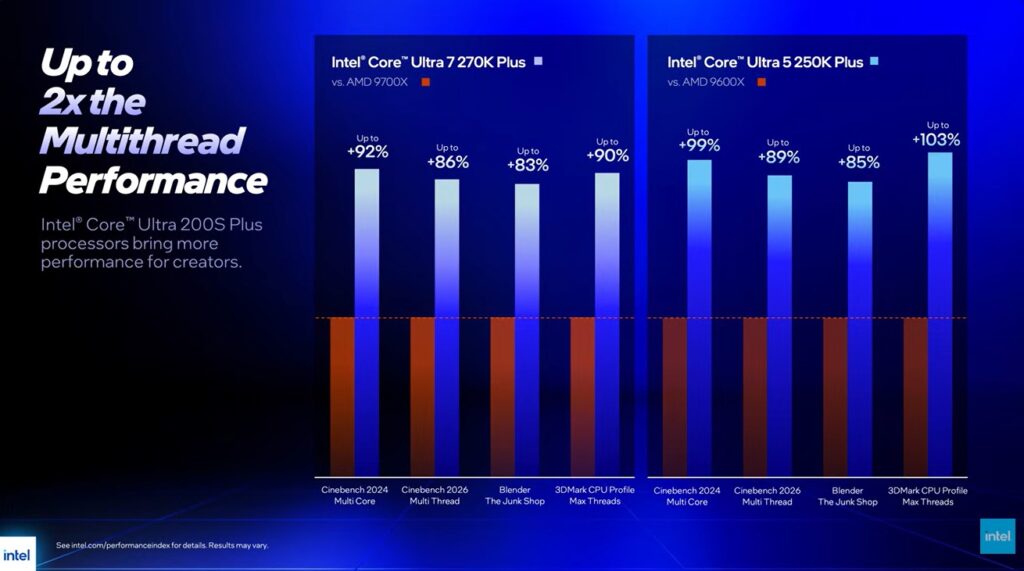
Besides looking a lot like past Arrow Lake chips, the Intel Core Ultra 200S Plus models also carry hidden tweaks. While those upgrades rarely show up on paper, they shape how smoothly the chip runs in actual use. Yet performance shifts are clear during everyday tasks.
Enhanced Die-to-Die Interconnect
Inside the chip, faster links between sections make a big difference now. These connections let parts like cores share info without delay. If those pathways lag, the processor sits idle, stuck waiting rather than working. Speed here means less downtime during tasks.
Smaller delays within Intel’s chips help parts communicate faster. Because of this, tasks using many cores at once run without hiccups. When game engines handle physics or artificial intelligence, speed gains are clear. Data zips between processing units better than before.
Faster app launches come from this update, and file handling speeds up, too. System reactions during regular use grow sharper as a result. Smoothness across the interface becomes noticeable right away.
Gaming Performance Improvements
What stands out most? The Intel Core Ultra 200S Plus chips handle games better than before. Performance jumps about 15 percent on average when stacked against older Intel Core Ultra desktop models, according to Intel.
Stable Frame Rates Keep Up With Fast Gameplay
These days, hitting big numbers on performance isn’t the whole story. Smoothness plays an equal role. When frames come out in bursts instead of a steady flow, the experience stutters – despite what the stats suggest. Even fast averages might hide a bumpy ride underneath.
Smooth frame delivery gets a boost from faster clocks and lower delays in the latest chips. When paired with displays that refresh quickly, steady timing really shows its value mid-motion.
Serious gamers usually pick screens that refresh at 144 Hz, sometimes 240 Hz, or higher. To keep up, the computer’s brain has to push out images without delay, again and again. Intel’s newest chips tackle this by using speed-focused cores while quietly handling background jobs on separate units.
Intel binary optimization technology
Built into the upgrades was a tool from Intel called Binary Optimisation. What it does is reshape application behaviour toward the processor.
Software tweaks boost speed.
A fresh spin on efficiency – Binary Optimisation studies how software already runs, then reshapes its flow so processors chew through work smarter. Rather than forcing coders to rebuild from scratch when machines change, it bridges apps and chips like an interpreter, fine-tuning each word. What you get isn’t magic, just clever routing behind the scenes.
Older programs might run faster on new processors, thanks to this method. What does that mean for people using them? The apps they rely on simply work better.
Workloads run more smoothly together because the tech adjusts well to each task. Efficiency climbs when systems handle variety without slowing down. Versatility grows as the processor adapts on its own.
Pricing and Where It Stands
A price move by Intel hints at sharp thinking behind the new Intel Core Ultra 200S Plus lineup. Enthusiasts weighing speed against spending may find these chips hard to ignore, especially when every dollar counts during upgrades.
| Processor | Cores / Threads | Max Turbo | Base TDP | Estimated Price |
|---|---|---|---|---|
| Core Ultra 7 270K Plus | 24 cores (8P + 16E) / 24 threads | Up to 5.5 GHz | 125W | ~$299 |
| Core Ultra 5 250K Plus | 14 cores (6P + 8E) / 14 threads | Up to 5.2 GHz | 125W | ~$199 |
Starting near $199, the Core Ultra 5 250K Plus fits well in mid-tier gaming setups. Priced around $299, the faster Core Ultra 7 270K Plus lands just below high-end models, giving serious players extra power at a lower cost.
Availability and Launch Timeline
Starting March 26, 2026, Intel’s Core Ultra 200S Plus chips hit shelves. Available via approved vendors, these processors show up at top web outlets in various areas. Region-wide access rolls out alongside official retail channels, launching them.
Later that year, ready-made computers from big brands should start showing up. Some will come with special tweaks plus upgraded fans meant just for these chips.
Implications for Assembling Computers
Come 2026, building a custom gaming rig gets a fresh twist thanks to the arrival of Intel’s Intel Core Ultra 200S Plus lineup. Faster base clocks define these chips, setting them apart from the start. Inside, data moves more quickly between components, reducing workload fluctuations. Instead of pure power, they blend core types – some built for speed, others for saving energy. This mix keeps things responsive without guzzling watts. Gamers now have one more solid pick when choosing what drives their system forward. Performance feels sharp while staying within reasonable limits on heat and draw. A subtle shift, yet meaningful for those who weigh every part carefully. For those building a system on a tighter budget but still wanting solid gaming power, the Intel Core Ultra 5 250K Plus stands out. On the flip side, users tackling heavier tasks that require additional processing threads could lean toward the Intel Core Ultra 7 270K Plus instead.
A fresh wave of desktop chips from Intel delivers faster gaming without pushing costs too high. Americans might lean toward these new models, especially since creative work runs more smoothly now. Power meets value here, drawing interest beyond just one crowd. These updates arrive at a moment when price matters more than ever. Performance jumps stand out, yet the real story lies in who can finally afford it.
Intel Desktop CPU Future Trends
The new Intel Core Ultra 200S Plus line shows Intel leaning into small but meaningful tweaks instead of sweeping changes. Starting with what already works, they fine-tune components like mixed-core setups and pathways within the chip. Each update pushes speed a little further, building step by step without reinventing the base. Progress comes through precision, not overhaul – each version inching ahead where it counts.
When new games demand more power, Intel can move fast. Because software for design changes often, chips need to keep up. As AI tools grow smarter each year, speed matters even more than before.
A fresh batch of chips pushes things forward once more. Faster speeds here, better job handling there – inside each unit, parts talk quicker now. Small tweaks add up when you actually use them.
Conclusion
Starting off fresh, Intel’s new Core Ultra 200S Plus chips bring small but meaningful upgrades to desktop computing. With faster peak speeds alongside smarter design inside, they handle both games and daily tasks well. Instead of just pushing raw numbers up, the changes work quietly behind the scenes. There is no big jump in cost, even though capabilities improve. One model stands out – the Intel Core Ultra 7 270K Plus – built for heavier loads across many cores. Then there is another choice, the Intel Core Ultra 5 250K Plus, offering solid speed without stretching your budget too far.
Not just smoother gameplay but quicker reactions might catch a gamer’s eye. Creators get extra power too – more cores handle heavy tasks like editing or running several apps at once. On top of that, Intel’s built-in tuning tweaks older programs to run better without extra effort.
One step ahead for anyone assembling a desktop next year, these chips bring speed, smart power use, and not too high a cost. Hitting shelves near the end of March, Intel’s Ultra 200S Plus lineup shows up just as rivals sharpen their own offerings.