
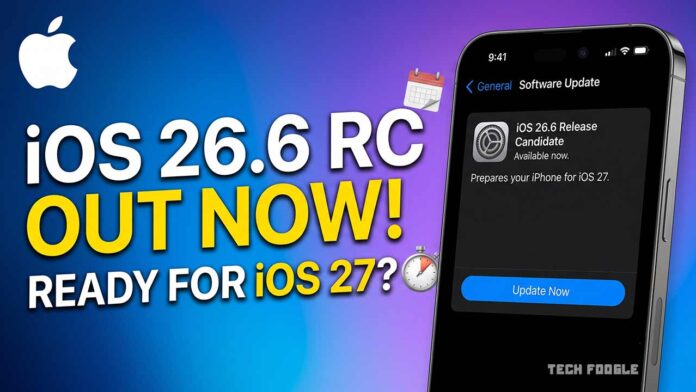
Apple has pushed iOS 26.6 into the Release Candidate stage. That’s the final checkpoint before a software update reaches every eligible iPhone. It also means one thing for iPhone owners: iOS 27 is closer than it feels.
The Release Candidate arrived after four rounds of developer betas and public testing throughout the summer. Apple has now combined every fix, tweak, and patch into one release-ready build. If nothing breaks during this last review, this exact version becomes the public release.
So what’s actually inside iOS 26.6? Less than you’d expect, and that’s on purpose. Apple’s attention has already shifted toward iOS 27. But there’s one detail buried in the release notes that matters more than it looks.
Table of Contents
What’s New in iOS 26.6
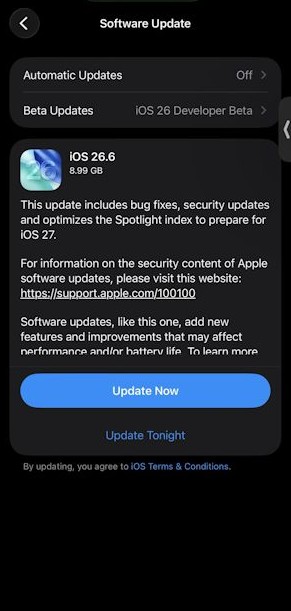
Apple’s official release notes keep things short:
“This update includes bug fixes, security updates, and optimizes the Spotlight index to prepare for iOS 27.”
Three sentences. One of them is doing a lot of quiet, heavy lifting.
The Spotlight Indexing Fix, Explained Simply
Spotlight is the search engine living inside your iPhone. Every time you swipe down on your home screen and type a name, an app, or a random memory, Spotlight digs through your photos, messages, files, and settings to bring back a result in a fraction of a second. It does this by keeping an index, essentially a giant, constantly updated map of everything on your device.
Here’s the problem. When Apple shipped iOS 27 Developer Beta 1 last month, several developers reported something strange: their iPhones were stuck indexing for extended periods, sometimes for a week or more, according to 9to5Mac. Background processes chewed through battery life and slowed things down, right when people wanted actually to test the new software.
Apple traced the bottleneck to Siri AI, the headline feature coming in iOS 27. That system leans heavily on Spotlight to understand what’s on your Phone so Siri can act on it. More context awareness means more indexing work, and Apple apparently underestimated how much of a strain that would put on devices upgrading cold.
So instead of dumping all that indexing work on iOS 27 at once, Apple is spreading it out. The iOS 26.6 RC starts optimizing your Spotlight index now, ahead of time, on hardware that isn’t yet running the new AI features. Think of it like pre-loading the dishwasher before guests arrive instead of scrambling once they’re already at the table.
It’s a small move with an unusual signal attached to it. Apple rarely name-drops a future OS version inside a current update’s release notes. Doing it here suggests the company wants this transition to feel smooth, not stuttery, when iOS 27 lands with the new iPhones this fall.
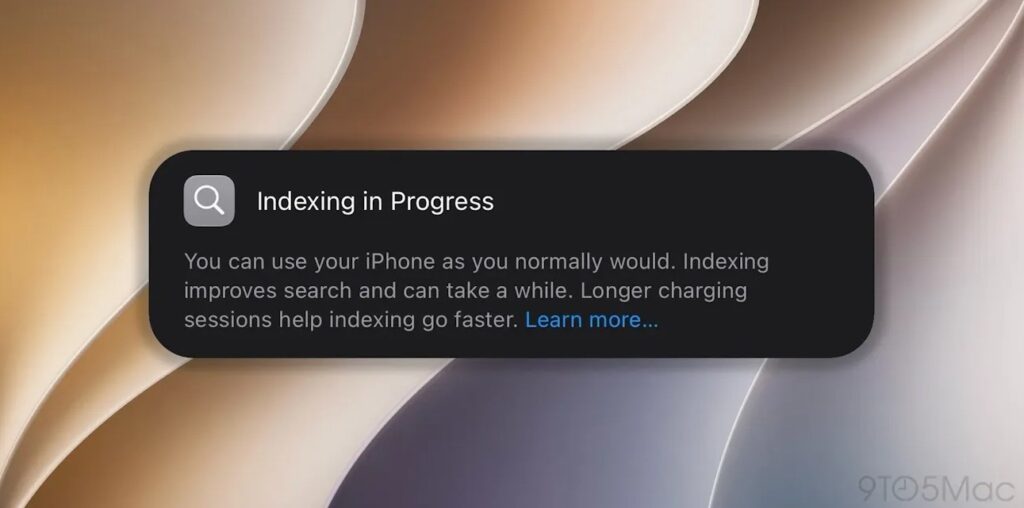
Practically, here’s what it means for you: after installing iOS 26.6, don’t be surprised if your iPhone runs a bit warmer or your battery dips slightly faster for a day or two. That’s Spotlight quietly doing its homework so iOS 27 doesn’t have to cram before the exam.
The Blocked Contacts Alert Sticks Around
The second notable change isn’t new to the Release Candidate. It first showed up back in iOS 26.6 Developer Beta 1, and Apple has kept it through every build since.
Here’s the backstory. iOS has always capped how many phone numbers you can block. Apple never documented the limit publicly, which left a lot of people confused when their Phone quietly stopped blocking new spam callers. According to MacRumors and multiple beta testers, that ceiling appears to sit somewhere between 8,000 and 20,000 blocked contacts, depending on the device and carrier.
Most people will never come close to that number. But if you’ve spent years manually blocking every robocall and scam text, you can absolutely hit the wall. Until now, iOS gave you zero warning when you did.
iOS 26.6 fixes the silence, not the limit. Once you reach your device’s cap, you’ll now see a clear popup:
“Blocked Contacts Limit Reached. You’ve reached the maximum number of blocked contacts. To block additional callers, remove a blocked contact in Settings.”
It’s honest, if a little anticlimactic. Apple hasn’t raised the ceiling, and there’s still no bulk-delete option, so clearing space means swiping away entries one at a time in Settings, then Apps, then Phone, then Blocked Contacts. Not glamorous. But at least you’ll know why your blocking feature stopped working instead of blaming your carrier, your Phone, or the universe.
Why Apple Is Doing This Now
Zoom out and the pattern is clear. iOS 26.6 isn’t trying to wow anyone with new features. It’s a maintenance release that happens to be laying groundwork for a much bigger update.
iOS 27 is expected to arrive this September alongside the new iPhone lineup. It’s shaping up to be one of Apple’s more ambitious software releases in years, built around a reworked Siri and deeper Apple Intelligence integration. Getting the plumbing right before that launch matters more than any single flashy feature in 26.6.
It’s a bit like a restaurant doing prep work an hour before opening. Nobody at the table sees the chopped onions or the simmering stock. Still, they’ll absolutely notice if dinner takes forty minutes because nobody bothered.
Which iPhones Can Install iOS 26.6?
The Release Candidate is rolling out now to every iPhone model that supports iOS 26. According to Apple’s own compatibility list, that spans from the iPhone 11 lineup, powered by the A13 Bionic chip, all the way through the newest iPhone 17 and iPhone 17e models. Roughly thirty different iPhone models qualify, covering six years of hardware.
If your iPhone launched with an A13 chip or newer, you’re eligible. If you’re still on an iPhone XS, XR, or older, iOS 26 and its follow-up updates are out of reach, and it may be time to think about upgrading.
How to Install the iOS 26.6 Release Candidate
If you’re enrolled in Apple’s developer or public beta program, grabbing the Update takes a minute:
- Open Settings on your iPhone.
- Tap General.
- Select Software Update.
- Tap Update Now once iOS 26.6 RC appears.
A quick word of caution: this is still pre-release software. Even at the Release Candidate stage, Apple can and sometimes does issue another RC build if testers flag a serious bug. Back up your iPhone through iCloud or your computer before installing, especially if it’s your daily driver. Nobody wants to lose their photos over a search-indexing improvement.
What Happens Next
With the Release Candidate now in testers’ hands, Apple is in its final review window. Assuming no major issues surface, iOS 26.6 should reach the general public within days, closing out the iOS 26 era as attention fully shifts to iOS 27.
For most users, iOS 26.6 will feel like a quiet, forgettable update. But that’s the point. The real payoff shows up later this fall, when iOS 27 installs smoothly instead of leaving your iPhone chugging through background indexing for a week. Sometimes the most important updates are the ones you barely notice.