

Google has begun reinforcing its control over Android applications that silently drain batteries in the background. Having been tested on the system in a beta phase last year, Google Play has now added a new measure within Android Vitals named the Excessive Partial Wake Lock measure.
This new indicator is supposed to highlight the apps that keep a device needlessly awake, leaving the phone unable rest and burning more power than users anticipate.
The shift is an indication of a more aggressive approach by Google, trying to put the brakes on highly rated apps that steal system resources without raising eyebrows.
Table of Contents
Play Store Fines Starting March 1, 2026
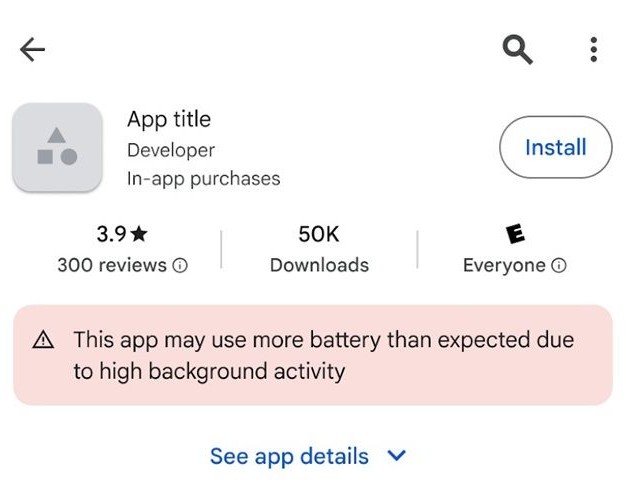
Starting on March 1, 2026, app developers who repeatedly fail to meet Google’s battery efficiency requirements will face a physical repercussion within the Play Store ecosystem.
These consequences will not be understated. In a clear effort to ensure that those individuals who perpetrate offenses against others are dealt with, Google has made it clear that individuals who act persistently can receive public notices and be less exposed in the store.
When an application keeps the phone’s CPU awake with a clear justification, users browsing the application’s Play Store page will see a noticeable warning. The notice will also inform potential downloaders that the application will consume battery power due to excessive background activity.
Such warnings can drastically impact user trust and the rate of installations.
Low Visibility and Fewer Downloads
The effects are not just limited to warning labels.
Applications that are marked as battery abusers will also lose prominence on the Play Store. Google can push them down in its rankings for recommendations, curated lists, and discovery features.
In practice, it will result in fewer organic installs and poorer overall reach.
The battery consumption problems will now be recorded in Android Vitals, and critical performance issues, such as crashes or stability issues, will be logged. That is, ineffective power consumption is regarded as a major quality failure rather than a trifling inconvenience.
How does Google know that an App is a battery killer?
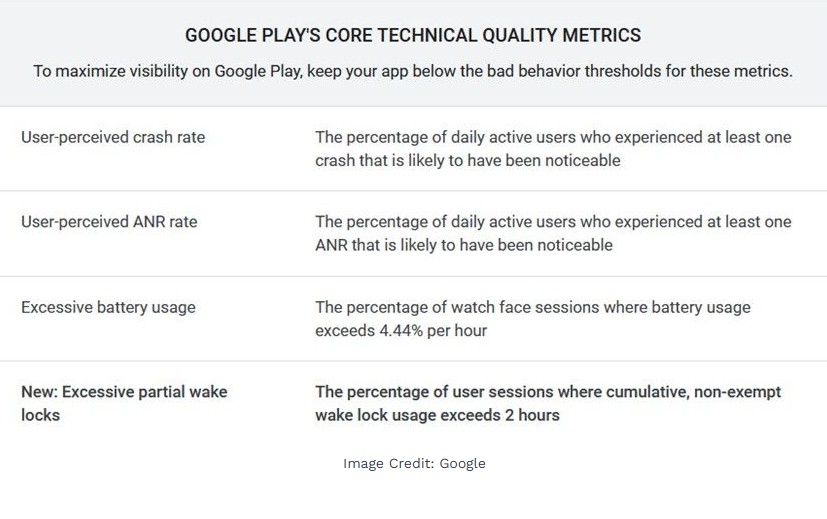
Google has given quite a narrow trigger for enforcement.
An application risks being penalized for failing to put the CPU to sleep when the device screen is off for extended periods. The standard that Google has established is fairly accurate:
- It takes an average of over 2 hours for the CPU to be shut down.
- The action is observed in more than 5 percent of user access.
This measure covers 28 days
As an app surpasses that threshold, it becomes subject to warnings and ranking penalties.
Google also recently announced more quality signals that Play Store apps would be judged by. The behavior of the battery is not the sole element in a larger project focused on the overall reliability and performance of apps.
Some Apps Are Exempt
Not all background tasks are considered suspicious.
Some applications really need background processing, and Google understands this. Applications that execute user-driven processes are not punishable.
Examples include:
- Background audio playing applications.
- Location Tracking Apps.
- Services that charge for downloading files or for data synchronization.
Background activity is justified and to be expected in such cases.
The Android Vitals dashboard provides these metrics that developers can use to track whether their apps are in problematic territory.
Google recommends that developers use current APIs.
Google has also provided technical instructions to help developers evade penalties.
Among the major recommendations will be to cease using manually controlled wake locks as much as possible. Rather, developers will be encouraged to migrate to the WorkManager API, which schedules background tasks more efficiently and minimizes unnecessary CPU usage.
In upload operations, Google recommends using the User-Initiated Data Transfer (UIDT) API, which facilitates more efficient data transfers without overloading system resources.
These devices enable processes to run in the background without requiring the device to stay awake longer than necessary.
The Implication of this to Android users
For the average smartphone user, this should be mostly positive.
Provided that developers do the right thing, Android apps ought to be more efficient, meaning they will have longer battery life and fewer instances of an unknown application killing a phone in the middle of the night.
The additional transparency is also present in the new warning labels. Individuals visiting the Play Store can easily spot harmful applications and avoid installing them.
Overall, it can be said that Google is making it clear that battery abuse will not be quietly accepted. Those developers who disregard efficiency principles are likely to lose visibility. In contrast, the optimizers of their software will probably gain a competitive edge in the Play Store.