

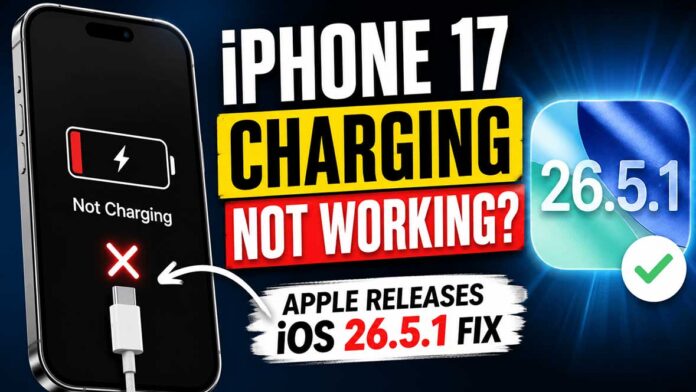
Nothing sparks worry like connecting an iPhone and getting silence. When certain iPhone 17 and iPhone Air models reached nearly empty battery levels, they ignored charging cables. These devices wouldn’t respond to Power at all – no light, no sound, just stillness. So even though plugged in, they stayed lifeless, trapped beyond reach.
Now, fixing things, Apple released iOS 26.5.1, which tackles the charging glitch head-on. When your iPhone 17 refuses to charge properly, that update steps in quietly but effectively.
Table of Contents
iPhone 17 Charging Issues Origins?
Some iPhones quit charging via cable when the battery got too low. It happened only under particular conditions. A flaw in how Power was managed caused the problem. Software issues were behind it, per Apple’s documentation.
Something odd happened inside the software, not because of broken cords, bad plugs, or malfunctioning parts. When the battery was too low, the system sometimes failed to recognize that it was receiving a charge.
Some people hit a snag they couldn’t easily fix: the machine required Power to work, yet the system blocked regular charging. One thing stopped another, leaving them stuck.
iOS 26.5.1 addresses the problem
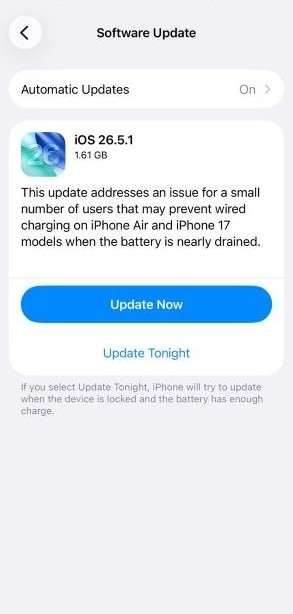
A glitch that messed up charging is what Apple aimed to fix with its fresh iOS 26.5.1 release. Fixes roll in quietly through this update, targeting only that issue. Nothing extra tagged along – just a narrow fix wrapped in new code. The patch appears subtle yet sharp, slicing through a specific bug. Charging behavior returns to normal after the download slips into place.
Now working differently, the software changes how it views Power when the batteries are very low. After installation, gadgets pick up charging cables correctly even with almost no charge left. Devices behave better under those drained conditions thanks to this fix.
Unlike big iOS updates full of fresh tools, version 26.5.1 focuses on fixing what’s broken. Since glitches have been reported, it works behind the scenes to smooth things out. While some expect flashiness, this one quietly brings devices back in line. Instead of adding clutter, it strips away instability. Because performance matters most here, changes stay under the hood. After installation, everything runs closer to how it should.
Should your iPhone 17 fail to charge, this solution addresses the issue rather than just masking symptoms. Some fixes only delay the issue – this one changes how the system responds. A reset occurs deep inside, not just at the surface level. Most attempts tweak settings; here, behavior shifts at startup. The phone begins recognizing Power differently after the application is installed. Temporary patches fade – this alters function long term. When charging stalls, the response now differs by design.
(Also See: Download iPhone 17 Series and iPhone Air Wallpapers [4K])
Why This iPhone 17 Bug Seemed Small But Was Actually Worse
What seems like a small problem at the start can turn into something much bigger. The truth is, this one caused real trouble.
Some people think connecting a charger will fix a drained battery. Not here. Software interference stopped the device from seeing Power – despite full hardware capability: a working cable, a live outlet, zero response.
Confusion spread fast – folks thought their devices were breaking. Cables got swapped, chargers changed hands, repair-shop trips piled up. Only later did it click: the glitch lived inside iOS all along.
Here’s something worth noting – problems with charging aren’t always about broken parts. These days, a phone’s ability to manage Power often depends on its internal software routines. A glitch behind the scenes can look just like a damaged port.
The Strange Truth About Charging Smartphones
When batteries run low, some think software matters less. Yet it usually plays a bigger role instead.
Most phones today rely on software to manage power consumption, protect the battery, control heat, and manage charging. Often, these digital systems matter more than the physical parts that deliver the charge.
A glitch in the code might, on rare occasions, cause problems, like something broken inside the machine.
Figuring out this difference makes it easier to fix problems. Instead of jumping to conclusions about a broken charger hole or bad power cell, look first to see if any system upgrades are waiting. What seems like hardware trouble might actually need a fresh update.
iPhone 17: Update to iOS 26.5.1
Most folks finish the update in under five minutes.
Start at the home screen; go into Settings. Slide up to find General options. Tap Software Update when it appears. Wait – iOS 26.5.1 might appear there. Once visible, begin downloading it right away. Finish by installing the file directly from the device.
Start by linking to a wireless network. Make sure the device has enough charge before proceeding with the setup steps.
When your gadget still works, a quick update reduces the risk of that charging issue later.
iOS 26 Reaches Last Phase
Out here, the rollout of iOS 26.5.1 hints at Apple turning its gaze ahead – to what comes after today’s version. While updates keep coming, focus seems to slide sideways, nudging toward the future build already taking shape behind the scenes.
By June 8, 2026, most expect Apple to unveil iOS 27 at its developer event. With that moment drawing closer, big updates to iOS 26? Probably not happening now. Instead, energy shifts toward what comes next.
One step ahead, Apple may push smaller updates through future iOS 26 versions. These tweaks might tighten security gaps while improving performance. Instead of big changes, expect quiet upgrades – like the fix for charging errors – to roll in quietly. Behind the scenes, stability could get a nudge without fanfare. Each patch feels like tuning an instrument, little by little. Not every update shouts; some simply steady the rhythm.
Now, steady performance matters more to those who use it than new features.
iPhone 17 Users Weigh Update to iOS 26.5.1?
Yes, it really is that simple.
Should that charging glitch ever show up, having the update means your phone runs on Apple’s newest stability fixes. When batteries drop dangerously low, odd charging patterns might appear – getting ahead of this beats facing a frozen screen down the line.
Though quiet, maintenance updates usually fix what matters most during regular use – far more than flashy new features do. These behind-the-scenes tweaks tend to slip under the radar, yet shape how smoothly things run each day.
Final Thoughts
A few people ran into trouble when their iPhone 17 wouldn’t charge, though it wasn’t widespread. Because the problem disrupted daily use, a solution became necessary. Now, thanks to version iOS 26.5.1, the glitch tied to power control has been corrected. Charging via cable works again as it should on those affected phones.
Update your iPhone 17 or iPhone Air soon – don’t wait. Though it seems minor, this patch fixes serious issues people actually face daily. With iOS 27 on the way, moments like this show tiny updates often carry big improvements. Problems disappear quietly when these get installed early.
One thing – some folks report slow charging on their new iPhone 17 or iPhone Air. If that happened to you, drop a line below. Another angle: staying updated helps, so join the mailing list for real talk on Apple moves, iOS fixes, and what actually works.
Source: MacRumours