

Google is preparing a major change to how Android users install apps from outside the Play Store. Starting in January 2027, the company plans to expand its Android developer verification system globally. This change will affect apps distributed through third-party app stores and direct APK downloads.
The announcement does not mean Android will completely block sideloading. However, installing apps from developers who have not registered with Google will become harder. Users who want to install unverified apps will have to follow an additional security process.
Google announced the expanded rollout on November 19, 2026. It plans to begin the global expansion with seven app distributors, then extend the protections to other installation sources and countries over the following months.
Table of Contents
What Is Google’s New Android Developer Verification System?
Android has always allowed users to install apps from sources other than Google Play. This feature, commonly known as sideloading, gives users more control over their devices.
You can download an APK from a developer’s website, install an app from another app store, or test software that you cannot find on Google Play.
Google now wants developers to verify their identities and register the apps they distribute to certified Android devices.
The system is called Android developer verification. It connects an app with the person or organisation responsible for creating it. Google checks the developer’s identity and registers the app’s package name and signing details.
This requirement will apply regardless of whether a developer distributes an app through Google Play, another app store, or a personal website.
Google says this change will make it harder for scammers to publish harmful apps under anonymous identities. When authorities or security systems remove a malicious app, its creator should find it harder to return with another app under a completely new identity.
There is one important distinction. Developer verification does not mean Google has reviewed every app or confirmed that its content is safe. Google’s own developer support page compares the process to checking someone’s identity rather than inspecting what they carry.
In other words, a verified developer can still create an unsafe app. Users must continue checking app permissions, download sources, and developer reputation.
When Will Google’s New Sideloading Rules Begin?
Google has already started testing these protections in selected markets.
On September 30, 2026, the first phase went live in Brazil, Indonesia, Singapore, and Thailand. The rules initially covered installations through seven participating app stores on certified Android devices.
Now, Google plans to expand the system globally.
The company has confirmed the following rollout schedule:
- January 2027: Global expansion begins with Google Play, Samsung Galaxy Store, Honor, Oppo, Xiaomi, Transsion, and Vivo.
- January and February 2027: Google and participating distributors continue preparing their developer registration systems.
- March 1, 2027: Google’s distributor guidance lists this as the target readiness date for wider enforcement across other stores.
- In the months that follow: Protections continue expanding across countries and installation sources.
This is an important detail. January 2027 does not represent a single worldwide switch that changes every Android phone overnight. Google describes a gradual rollout.
The company plans to cover all installation sources on certified Android devices as the expansion progresses.
For users in India, the announcement matters because India falls within Google’s planned global expansion. However, Google has not announced a specific activation date for India.
The first four markets were Brazil, Indonesia, Singapore, and Thailand. Indian Android users should therefore expect the change during the global rollout rather than assume that every device will receive it on January 1.
Which Android Phones Will Be Affected?
Google’s current documentation says the verification requirements apply to certified Android devices running Android 8 or later.
That includes a large range of Android smartphones and tablets from manufacturers such as Samsung, Xiaomi, OnePlus, Vivo, Oppo, Motorola, and other brands.
The key factor is certification, not the phone’s manufacturer.
Android devices that use Google’s certified services fall under these requirements. Google’s documentation also excludes AOSP devices and non-certified Android devices from this verification requirement.
The change will reach users through Google Play services. This allows Google to extend the protections across supported Android devices without requiring every manufacturer to release a separate operating system update.
However, the exact rollout schedule may differ by country and installation source.
Will Android Completely Block Sideloading?
No. Google has repeatedly stated that sideloading will remain part of Android.
The company is changing the installation process for apps from unverified developers. It is not removing the option to install applications from outside Google Play.
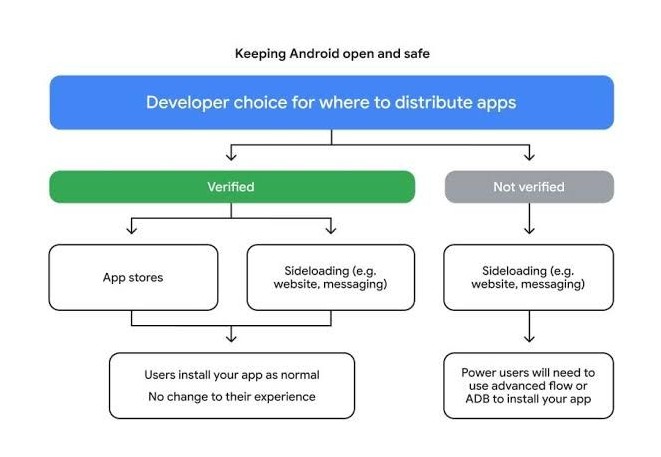
Developers who complete verification can continue distributing their apps through websites, independent app stores, and other channels.
The bigger change affects developers who refuse to register their apps.
When users try to install an unregistered app, Android will show a warning and block the standard installation process. Users who understand the risks can still proceed through Google’s Advanced Flow.
This means APK files are not becoming useless. However, downloading an APK and tapping the Install button may no longer be enough.
Google is trying to make users think twice before installing software from unknown developers. That could help people avoid fake banking apps, fraudulent delivery applications, and other harmful downloads.
It could also create extra work for users who regularly test independent software.
Google’s 24-Hour Waiting Period Explained.
One of the most noticeable parts of the new system is the Advanced Flow.
Google created this option for experienced users who still want to install apps from developers who haven’t completed verification.
However, the company has added several security steps.
According to Google’s Android Help documentation, enabling this option requires a one-time setup that includes a 24-hour security waiting period.
Users need to enable Android developer settings first. They can then open their phone’s Settings app, navigate to Developer options, and select the option to allow apps from unverified developers.
Android will guide them through the process, including the security delay.
After the 24-hour period ends, users can choose to keep Advanced Flow enabled for seven days or indefinitely.
Even after completing these steps, Android will continue displaying a warning when users install an app from an unverified developer. They must actively confirm that they want to proceed.
Google designed the waiting period to protect users from social engineering scams.
For example, scammers sometimes pretend to represent a bank, delivery company, or technical support team. They pressure victims into downloading an app that gives criminals access to personal information or financial accounts.
A forced delay gives users time to question the request instead of following instructions during a stressful phone call.
However, it also means that someone who urgently needs an unverified app may have to wait a full day before completing the installation.
Can Advanced Users Still Use ADB?
Yes. Android Debug Bridge, commonly called ADB, remains available for developers and advanced users.
ADB allows users to communicate with Android devices through a computer. Developers already use it to install test applications, debug software, and examine app behaviour.
Google has confirmed that developers and power users can continue using ADB to install modified or unverified apps on their own devices without completing developer verification.
This matters for people who build custom applications, test APK files, or work with modified software.
However, ADB is not the most convenient option for ordinary smartphone users. It requires additional tools and some technical knowledge.
Google’s Advanced Flow provides a more accessible route for people who want to install unverified apps without using a computer.
What Does Google’s Update Mean for Third-Party App Stores?
Third-party app stores are among the services that need to prepare for this change.
Google’s initial global expansion includes seven distributors:
- Google Play Store
- Samsung Galaxy Store
- HONOR App Market
- OPPO App Market
- Xiaomi GetApps
- Transsion Palm Store
- Vivo App Store
These distributors will need to work with developers to ensure that their apps meet Google’s registration requirements.
Apps from verified developers should continue installing normally. However, an app from an unregistered developer may require users to enable Advanced Flow before installation.
Google also plans to expand the protections to additional app stores and installation sources.
This could affect smaller independent stores and websites that distribute APK files directly.
For example, imagine that you download a popular open-source application from its official website. The developer has not registered the app with Google.
Even if you trust the website, Android may block the normal installation process. You would need to follow the Advanced Flow or use an appropriate development method.
The developer could avoid this extra step by completing registration.
What Should Android App Developers Do Before 2027?
Developers who distribute applications outside Google Play should prepare before the global rollout.
Google provides two main routes for developer verification.
Developers who publish through Google Play can use Google Play Console to check their app registration status. Google says it has automatically registered 99% of Play apps.
Developers who distribute exclusively outside Google Play can use the Android Developer Console.
They need to verify their identity and register the apps they want to distribute to certified Android devices.
Google also provides a separate option for students and hobbyists.
Its limited distribution account allows developers to share apps with up to 50 authorised devices. This account is free and does not require government ID verification.
For developers who need wider distribution, the full Android Developer Console account carries a $25 registration fee, according to Google’s documentation.
These options let independent developers prepare without forcing everyone into the same distribution model.
Google says registering an app takes less than ten minutes. However, developers should check their account details, app package names, and signing keys before the deadline.
Why Is Google Making Sideloading More Difficult?
Google says its main goal is to reduce malware and scams across Android.
Sideloading gives users freedom, but it also creates opportunities for criminals to distribute harmful applications outside the usual app store review process.
Scammers often use fake banking apps, payment services, and delivery-tracking apps to trick people into sharing sensitive information.
Developer verification links the application to an identifiable developer.
This makes it harder for criminals to release harmful apps under new anonymous identities repeatedly.
Google also says millions of apps have already completed registration. According to its November 19 announcement, those apps account for more than 99% of Android app installations globally.
That figure suggests most users may never notice a significant difference during everyday app installations.
However, the remaining apps still matter. Independent developers, open-source projects, custom applications, and smaller app distributors may need to adjust their workflows.
There is also a reasonable concern about Google’s growing role in Android distribution. Although developers can still choose where to publish their apps, they must now meet an additional requirement to reach users on certified devices.
That creates a genuine discussion about the balance between platform security and user freedom.
Will Google’s January 2027 Update Affect Normal Android Users?
Most users who download apps from Google Play should experience little change.
Google says the vast majority of Play apps have already completed registration. Users who stick to established app stores and recognised developers are therefore unlikely to notice the new process regularly.
The bigger changes will affect people who download APK files from independent websites or install applications from smaller developers.
Before installing an app, users should check the developer’s official website and confirm that the download comes from a trusted source.
They should also avoid installing applications when someone unexpectedly asks them to download software through a phone call, text message, or messaging app.
A familiar-looking app icon does not prove that an APK is genuine. Scammers can copy names, logos, and interface designs with little effort.
Google’s new system adds an extra identity check, but users still need to make sensible choices.
Final Thoughts
Google’s January 2027 Android developer verification rollout will change how people install apps from outside the Play Store.
Sideloading is staying, but installing an app from an unverified developer will involve more steps. The 24-hour waiting period will be one of the biggest changes for users who regularly install independent APK files.
For most Android owners, everyday app installations should continue as usual. Developers who distribute apps independently will need to prepare for the new requirements.
Google says the change will make Android safer by holding app creators accountable. Whether the extra restrictions strike the right balance between security and freedom will depend on how the system works once the global rollout reaches more users.